 PaintVisualizer
PaintVisualizer vs RoomsGPT
Detailed Feature, Workflow & Real-World Accuracy Comparison
The rise of generative AI has created two distinct categories of home visualization tools: full-scale generative interior redesign generators and precision architectural paint visualizers. RoomsGPT and PaintVisualizer.app illustrate this distinction clearly.
RoomsGPT is a broad generative AI platform offering room restyling, interior remodeling, design studio tools, and a dedicated paint visualizer for walls, cabinets, ceilings, and trim. PaintVisualizer.app focuses specifically on architectural color accuracy, preserving your existing furniture, decor, and structural details while swapping wall and trim colors with 5,000+ verified paint manufacturer formulas.
This neutral comparison explores AI generation precision, furniture preservation, brand color fidelity, pricing tiers, and practical renovation use cases.
Quick Comparison: PaintVisualizer.app vs RoomsGPT
A comprehensive side-by-side feature matrix verified against active platform capabilities.
| Feature / Capability | PaintVisualizer.app | RoomsGPT Paint Color Visualizer |
|---|---|---|
Upload your own photo Both accept user room photos | Yes | Yes |
Interior visualization Living rooms, kitchens, bedrooms, bathrooms | Yes | Yes |
Exterior visualization PV features dedicated exterior models | Yes | Limited |
Wall visualization Wall recoloring supported | Yes | Yes |
Ceiling visualization Ceiling selection supported | Yes | Yes |
Trim / doors / cabinets RoomsGPT supports cabinet and trim recoloring | Yes | Yes |
AI-assisted visualization Both employ generative/neural AI | Yes | Yes |
Preserve existing furniture exactly RoomsGPT redesign mode may alter decor; PV preserves exact objects | Yes | Limited |
Color picker Color browsing available | Yes | Yes |
Custom HEX / RGB colors Custom color values supported | Yes | Yes |
Paint brand colors PV has 5,000+ verified brand formulas; RoomsGPT includes general options | Yes | Limited |
Multiple color comparison Compare multiple shade iterations | Yes | Yes |
Before / after slider Interactive split-screen slider in PV | Yes | Limited |
Save projects Cloud project saving supported | Yes | Yes |
Download results Export high-res images | Yes | Yes |
Share results Link and image sharing | Yes | Yes |
Browser support Modern desktop and mobile browsers | Yes | Yes |
Mobile browser support Responsive web interface | Yes | Yes |
Account required to try PV offers guest preview without signup | No | Limited |
Free usage tier Starter credits or free preview | Yes | Limited |
What Is PaintVisualizer.app?
PaintVisualizer.app is an AI architectural color visualization platform designed specifically for real-world painting projects. Unlike generative redesign tools that hallucinate new furniture or alter room layouts, PaintVisualizer.app isolates walls, trim, and ceilings while keeping your existing decor, flooring, and lighting completely intact. It maps over 5,000+ calibrated swatches from Sherwin-Williams, Benjamin Moore, Behr, Asian Paints, PPG, and custom HEX codes with photorealistic daylight simulation.
What Is RoomsGPT?
RoomsGPT is an AI-powered interior design and room remodeling platform. In addition to full generative room redesigns (such as modern, minimalist, or bohemian styling), it offers a paint visualizer module allowing users to recolor walls, cabinets, trim, and ceilings. It operates on a credit-based subscription model and caters to homeowners seeking both broad aesthetic restyling and targeted color experimentation.
How Do PaintVisualizer.app and RoomsGPT Work?
Compare the step-by-step workflow from uploading a room photo to reviewing final color renders.
PaintVisualizer.app Workflow
Upload Your Real Room Photo
Upload a picture of your living room, kitchen, bedroom, or exterior.
Preservation-First AI Masking
AI isolates walls while strictly preserving all existing furniture, art, and trim.
Select Verified Paint Brand Codes
Audition shades from 20+ top brands or input custom HEX values.
Photorealistic Light Harmonization
The engine renders paint pigment responding to natural window light and shadows.
Interactive Before/After Slider
Swipe between the original room and the painted preview with an interactive slider.
Export Contractor Paint Card
Download high-resolution renders paired with exact paint manufacturer codes.
RoomsGPT Workflow
Access RoomsGPT Platform
Navigate to RoomsGPT web interface and sign in to an account.
Select Paint Visualizer or Redesign Tool
Choose the paint recoloring tool or the broader room redesign studio.
Upload Room Photograph
Upload an interior room photo into the generative AI pipeline.
Select Surfaces & Color Options
Indicate target areas (walls, cabinets, trim) and choose colors or design themes.
Generate AI Restyled Image
The cloud AI model synthesizes a newly colored or redesigned room preview.
Download or Iterate with Credits
Export the generated image using account credits or try additional prompts.
PaintVisualizer.app vs RoomsGPT: Feature Deep Dive
Detailed technical differences across photo upload, boundary detection, color matching, and rendering.
Photo Upload & Processing
Optimized for high-resolution personal room photos, maintaining exact camera perspective and optical characteristics.
Processes room photos through generative AI pipelines for both color recoloring and full stylistic redesigns.
Surface Masking vs Generative Hallucination
Focuses strictly on surface isolation: repaints walls, ceilings, and trim while guaranteeing that furniture, rugs, and decor remain unchanged.
Offers surface recoloring alongside generative remodel features that can reimagine furniture, lighting, and decor entirely.
Color Selection & Brand Accuracy
Maps 5,000+ verified manufacturer paint codes (SW, BM, Behr, Asian Paints) with calibrated light reflectance values.
Supports custom colors, color palettes, and general paint selections across design styles.
AI Technology & Rendering Depth
Uses neural scene understanding to calculate realistic light diffusion across existing room geometry and shadows.
Uses diffusion-based generative AI to re-render rooms with new aesthetic styles or color schemes.
Before & After Inspection
Interactive draggable split-screen slider allows continuous comparison between original and repainted states.
Provides side-by-side or toggled image comparisons of generated versions.
Saving & Contractor Deliverables
Generates detailed paint specification sheets ready for contractors or store visits.
Enables downloading high-resolution concept renders to share with clients or family.
Paint Brands and Color Library Coverage
Compare manufacturer shade databases and color formulation support.
| Paint Brand / Source | PaintVisualizer.app | RoomsGPT |
|---|---|---|
Sherwin-Williams PV has full SW calibrated formulas | Yes (1,700+ shades) | Limited |
Benjamin Moore PV has complete BM catalog | Yes (3,500+ shades) | Limited |
Behr PV has full Behr catalog | Yes (Full library) | Limited |
Asian Paints Excluded on RoomsGPT | Yes (2,200+ shades) | No |
PPG Paints PV has calibrated database | Yes (Calibrated) | Limited |
Custom HEX & RGB codes Both accept direct HEX values | Yes (Direct input) | Yes |
Visualizing Paint Colors on Your Own Room
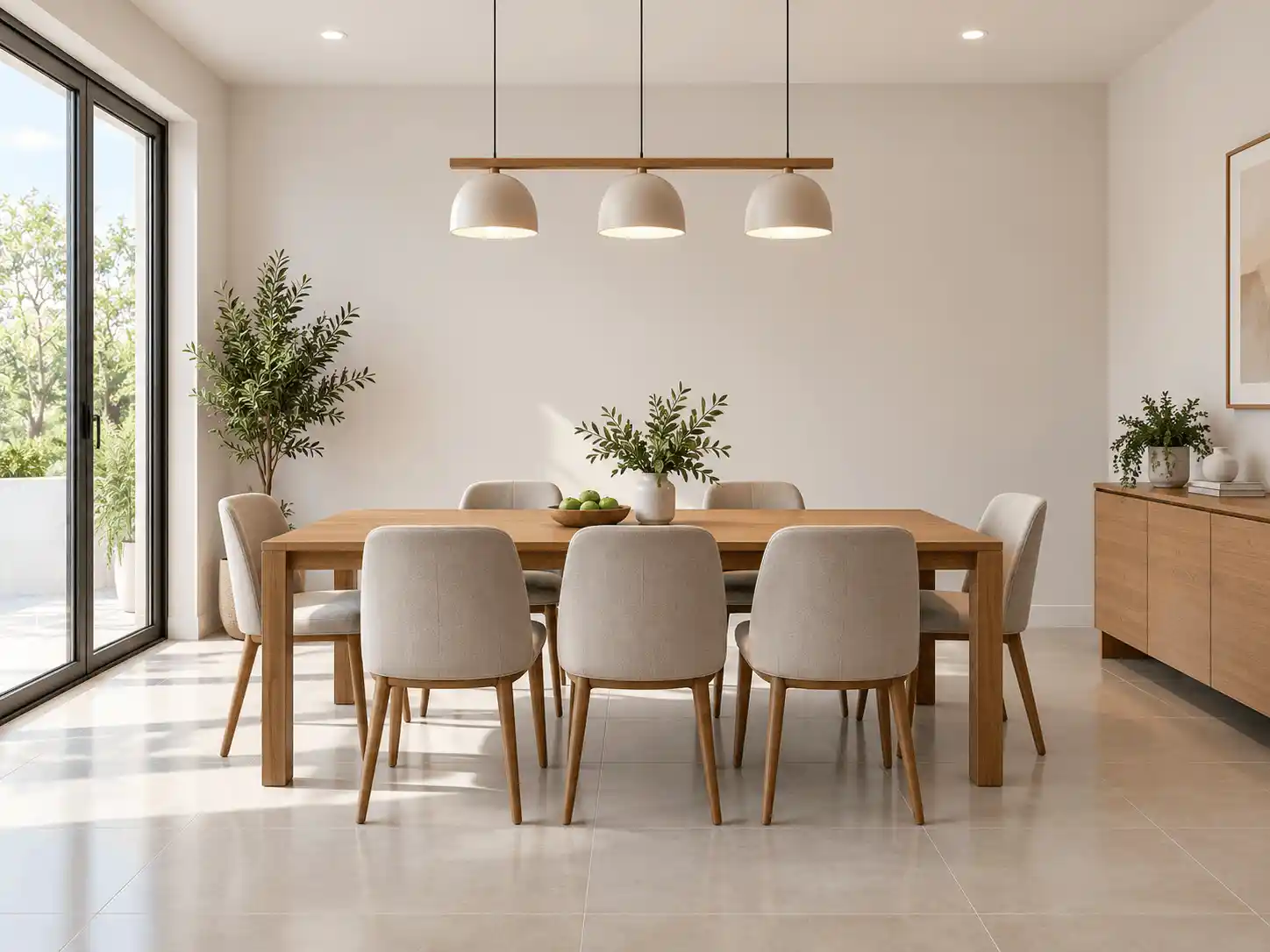
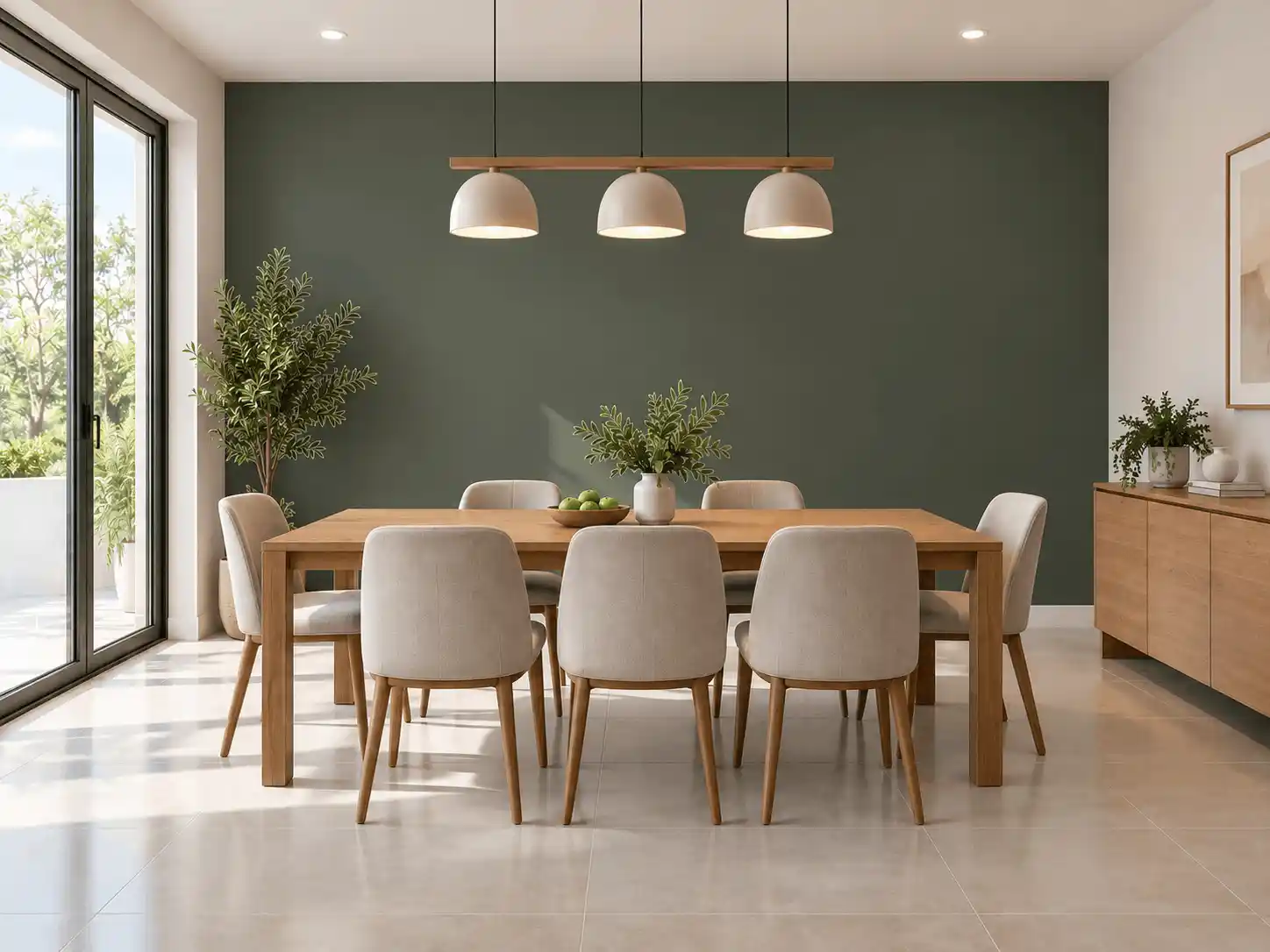
When planning a real painting job, you need to see how new colors look on your actual walls without altering your furniture, curtains, or flooring. Below is an authentic before-and-after demonstration of architectural paint visualization.
Key Visual Integrity Standards
- Guarantees your real furniture, rugs, and artwork remain completely unchanged
- Preserves delicate ambient shadows around cornices, baseboards, and windows
- Accurately previews light reflectance in daylight and evening lighting
- Interactive slider lets you inspect transitions before buying paint
Interior Room Visualization
Both tools support interior spaces like living rooms, kitchens, bedrooms, and bathrooms. PaintVisualizer.app guarantees exact furniture preservation, while RoomsGPT can also suggest entire decorative redesigns.
Exterior House Visualization
Exterior visualization tests curb appeal on siding, brick, and shutters. PaintVisualizer.app includes dedicated exterior neural models; RoomsGPT focuses predominantly on interior rooms.
AI Paint Visualization vs Traditional Virtual Painting
Understanding the mechanical difference between basic color overlays and deep neural scene synthesis.
Traditional Color-Overlay Painting
Traditional virtual visualizers apply semi-transparent color washes over polygons, producing a flat and artificial result.
Neural Scene Understanding & Light Synthesis
Modern AI tools use neural models to understand 3D scene depth and lighting. However, generative redesign tools often alter non-wall objects, while architectural visualizers preserve existing elements.
Note: RoomsGPT offers generative redesign flexibility, while PaintVisualizer.app specializes in preservation-focused architectural paint visualization.
How Accurate Are Paint Visualizers in the Real World?
Digital visualizers are critical for narrowing color options, but physical test swatches remain essential before buying full gallons.
Mobile and Desktop Experience
Platform availability, responsive browser support, and native applications.
| Platform / Device | PaintVisualizer.app | RoomsGPT |
|---|---|---|
| Desktop Browser | Yes | YesFull web experience |
| Mobile Browser | Yes | YesMobile web interface |
| iOS App | Limited | NoWeb-first platforms |
| Android App | Limited | NoWeb-first platforms |
| Tablet Browser | Yes | YesTablet compatible |
Pricing and Free Usage
Usage allowances, credit systems, subscriptions, and account requirements.
| Pricing Dimension | PaintVisualizer.app | RoomsGPT |
|---|---|---|
| Free Visualization | Available on both platforms | Available on both platforms |
| Free Usage Tier | PaintVisualizer.app provides free trial generations; RoomsGPT offers limited starter credits | PaintVisualizer.app provides free trial generations; RoomsGPT offers limited starter credits |
| Credits / Token Model | Both platforms offer credit packs for high-volume high-res rendering | Both platforms offer credit packs for high-volume high-res rendering |
| Subscription Plans | Optional subscription tiers available for regular users and professionals | Optional subscription tiers available for regular users and professionals |
| Account Requirement | No account needed for initial test on PaintVisualizer.app; RoomsGPT typically requires sign-in | No account needed for initial test on PaintVisualizer.app; RoomsGPT typically requires sign-in |
Who Is PaintVisualizer.app For?
- Homeowners wanting to test real paint brand colors without altering their furniture or decor
- Painters and contractors preparing accurate color mockups for client approval
- Designers needing exact manufacturer formulas (SW, BM, Behr, Asian Paints) and custom HEX codes
- Renovators evaluating both interior spaces and exterior house facades
Who Is RoomsGPT For?
- Homeowners exploring total room redesigns and new furniture concepts
- Real estate professionals creating concept staging ideas
- Design enthusiasts experimenting with interior styles (modern, boho, industrial)
- Users wanting both room remodeling and basic paint color previewing
PaintVisualizer.app: Advantages
- Strict preservation of existing furniture, art, flooring, and room architecture
- Multi-brand library covering 20+ manufacturers (5,000+ calibrated swatches)
- Dedicated support for exterior house facades as well as interior rooms
- Interactive split-screen slider for nuanced before-and-after evaluation
- Guest-friendly workflow with no initial sign-up required
PaintVisualizer.app: Limitations
- Does not generate new furniture or virtual home remodeling concepts
- High-resolution batch exports utilize cloud computing credits
RoomsGPT: Advantages
- Broader generative AI capabilities, including complete room restyling
- Supports cabinet, trim, and ceiling recoloring
- Useful for inspirational interior design and furniture staging ideas
RoomsGPT: Limitations
- Generative redesign models may alter furniture or room details unexpectedly
- Less specialized in physical paint manufacturer color catalogs
- Credit consumption can be high when iterating multiple design styles
- Limited exterior facade visualization options
Which Tool Fits Your Project Workflow?
Guidance tailored to practical scenarios rather than subjective rankings.
| If you want to... | Consider | Why |
|---|---|---|
| See how a real paint color looks without changing your furniture | PaintVisualizer.app | PaintVisualizer.app guarantees exact preservation of existing furnishings and decor. |
| Completely restyle your room with new furniture and decor ideas | RoomsGPT | RoomsGPT offers generative AI room redesign and staging capabilities. |
| Audition official Sherwin-Williams or Benjamin Moore paint codes | PaintVisualizer.app | PaintVisualizer.app includes over 5,000+ calibrated physical manufacturer colors. |
| Visualize exterior siding and trim | PaintVisualizer.app | PaintVisualizer.app includes dedicated exterior architectural neural models. |
Try PaintVisualizer.app Free
Upload any room photo, test over 5,000+ designer paint shades from top global manufacturers, and see realistic daylight and shadow interactions in seconds.
Frequently Asked Questions
Clear, factual answers to common questions about PaintVisualizer.app and RoomsGPT.
Explore More Paint Visualizer Comparisons
Compare other popular paint brand tools, mobile visualizer apps, and AI design studios.
PaintVisualizer vs PPG Paints
Compare PaintVisualizer.app and PPG Paints Visualizer for room color visualization, wall painting previews, AI tools, color selection, and photo-based paint testing.
PaintVisualizer vs Asian Paints
Compare PaintVisualizer.app and Colour with Asian Paints for room color visualization, wall painting previews, AI tools, shade selection, and photo-based paint testing.
PaintVisualizer vs VisualizeColor
Compare PaintVisualizer.app and VisualizeColor for online room color visualization, wall painting previews, AI tools, photo uploads, and color exploration.
PaintVisualizer vs Sherwin-Williams
Compare PaintVisualizer.app and Sherwin-Williams ColorSnap Visualizer for room color visualization, wall painting previews, AI tools, and color exploration.
PaintVisualizer vs Dehome
Compare PaintVisualizer.app and Dehome Paint Color Visualizer for AI room color visualization, wall painting previews, area selection, and high-res results.
PaintVisualizer vs Nippon Paint
Compare PaintVisualizer.app and Nippon Paint Colour Visualizer for room color visualization, wall painting previews, mobile app experience, and shade selection.
PaintVisualizer vs Behr
Compare PaintVisualizer.app and Behr Color Visualizer for room color visualization, wall painting previews, AI tools, sample rooms, and color exploration.
Feature information and product capabilities were compiled from publicly available documentation, first-party product portals, and active web tools as of September 2026. Features, app store availability, pricing tiers, and manufacturer shade collections are subject to change.